Pages

Tuesday, February 11, 2014

Android: How to send email from android application

Create a Linear xml layout as below,

In Android, we can use Intent.ACTION_SEND to call an existing email client to send an email.
Below shows the complete code for sending an email.
package com.example.sampletestapp;

import android.app.Activity;
import android.content.Intent;
import android.os.Bundle;
import android.view.View;
import android.widget.EditText;

public class SendMail extends Activity {

    EditText edtTo, edtSub, edtMsgs;

    @Override
    protected void onCreate(Bundle savedInstanceState) {
        super.onCreate(savedInstanceState);
        setContentView(R.layout.sendemail);
        initializeVars();
    }
    private void initializeVars() {

        edtTo = (EditText) findViewById(R.id.edtTo);
        edtSub = (EditText) findViewById(R.id.edtSubj);
        edtMsgs = (EditText) findViewById(R.id.edtMsg);
    }
     //emailSend() set to onClick() of Send Mail button in xml layout
    public void emailSend(View v) {
        String message = edtMsgs.getText().toString();
        String to=edtTo.getText().toString();
        String subj=edtSub.getText().toString();

        Intent emailIntent=new Intent(android.content.Intent.ACTION_SEND);
        emailIntent.putExtra(android.content.Intent.EXTRA_EMAIL, to);
        emailIntent.putExtra(android.content.Intent.EXTRA_SUBJECT, subj);
        emailIntent.setType("plain/text");
        emailIntent.putExtra(android.content.Intent.EXTRA_TEXT, message);
        startActivity(emailIntent);       
    }
}
Run the application and fill in all the fields and click Send Mail button.

The screen will be displayed as,
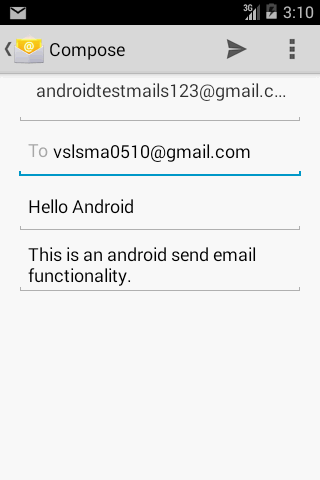
Check the email and message will be received successfully.

Sunday, February 2, 2014

Android: How to add Ads in your Android App

These are few steps showing how you can add admob ads to your android applications.
First create an admob account in http://www.google.com/ads/admob/  or if you already have an admob account, login to your account.
Give all the payment information and then select Sites & Apps tab .Click Add Sites/App, now select Android App

and fill all the informations including App name, Android Package Url and click Continue.

Click on the link "See developer's guide, examples, and FAQ at Google Code" and open it in a new tab.

Click Download Admob Android SDK button, extract the file and copy the sdk jar file,GoogleAdMobAdsSdk-6.4.1.jar to projects lib folder in eclipse.
Right click the Project and select properties. Choose Java Build Path and add the downloaded external sdk jar file.
Now go to the page "see developer's guide", which is already opened in a new tab. Goto "Defining a com.google.ads.AdView" section and copy the code marked in red rectangle box below,

and paste it into your activity.xml file and save it.

Go back to admob website and click "Goto Sites/Apps" button
Here you see you App name listed, click Manage Settings .

A publisher Id will be displayed in next window. Copy the Publisher id and paste it into the
activity.xml file


Next we need to copy some codes to AndroidManifest.xml file. For that again go back to page that we opened in the new tab,"See developer's guide" page.
At the end of the page just above the "The Result" section click on the download example project.

Extract the downloaded file and open the BannerXML folder and open the AndroidManifest.xml file using a text editor and copy the below code to your AndroidManifest file in your project.

Save your project and run as android application. Ads will now show up in your android app.

Saturday, February 1, 2014

Android: A solution for solving the Error, "There is a problem parsing the package"

Parse error while installing your apk file to android device.
Error: There is a problem in parsing package

This error could be caused due to several reasons. I got a solution that rectified the above error.
These are following steps, In eclipse first open your Manifest file, AndroidManifest.xml under res tab.
Change the code below,
                            android:versionCode="1"
                            android:versionName="1.0"
 to
                            android:versionCode="2"
                           android:versionName="2.3.4"
   
Also remove the code,
                            <uses-sdk
                                    android:minSdkVersion="19"
                                    android:targetSdkVersion="19" />
       
and save AndroidManifest.xml file. Create the apk file again with updated Manifest file.
Now successfully Install the apk file again in your phone.

Thursday, January 30, 2014

Android: Install your Android App from PC to Mobile

Here are the followig steps that shows how to install your app from pc to mobile.

First download the Astro File Manager app in your phone. The Astro file manager helps to view your apk file in phone
Then Go to Settings->Application Manager->check the unknown resources option that allows you to install non market applications.
After the above steps, connect your phone to the pc.
Now wait till all the drivers get installed in to your pc.
Open the drive location and copy the apk file.
Then disconnect your phone from pc and go to My Files in your phone and check whether the apk file is copied successfully.
Open astro file manager and search for the copied apk file. Click on the searched file.
The apk file is now opened with astro file manager. Click Install and now you successfully installed your android app from pc to your android phone.

Wednesday, January 29, 2014

Android: Create an Android Application Package(apk) file

An android application package(apk) file is used to distribute and install software in android operating system. These are the following steps for creating an apk file.

 Select the project in Package Explorer. Right click the project and click Export
In the export window, select Export Android Application. Click Next
Select the project to export and click Next.
In Keystore selection choose either Use existing keystore or Create new keystore. Here I choose create new keystore. Choose a location where you want to store the file. Enter password(give any password) and click Next.
In key creation, enter Alias name, passwords, validity years and firstname lastnames which are mandatory fields. Rest of the fields are optional. Click Next.
In destination for apk file choose an appropriate location where you want to store the apk file. Click Finish.
If the apk is created successfully the new keystore status and certificate finger prints will be displayed in console tab in eclipse.

 Finally make sure the apk file is created and saved successfully in the location specified.

Friday, November 29, 2013

C#: Bubble Sort

Bubble sorting is the simplest sorting algorithm. In bubble sort, we compare the consecutive pair of values in an array. Start from the beginning of the array, compare the first value with the following next value. If the first value is greater than the following value, then swap both the values. Else continue with the next consecutive pair. Continue this process for n-1 times, where n is the length of an array.

Suppose, you have an unsorted array of 5 elements
    
                             
 Here first iteration compare the first value with the second value


Now continue the iteration 4 times ie, n-1 times where n is the number of elements in an array
After 4 iterations the array will be as follows,


It's very easy to implement the above algorithm not only using C# but also in every programing languages. Here's an example program

//Method for bubble sorting
public void bubble(List<int> sort)
        {
//set a temporary variable
            int tempvar;
//Iterate through n-1 times
            for (int i = 1; i <= sort.Count; i++)
            {
//loop through each elements in all iterations
                for (int j = 0; j < sort.Count-i; j++)
                {
//compare each value with the following value,
//if greater then swap, else continue to next consecutive pair
                    if (sort[j] > sort[j + 1])
                    {
                        tempvar = sort[j];
                        sort[j] = sort[j + 1];
                        sort[j + 1] = tempvar;
                    }
                }
            }
//display sort
            display(sort);
        }

//Input array: {3,2,4,1,5}

Output:
1,2,3,4,5

Thursday, May 30, 2013

C#: Stack Implementation with and without Stack class

Stack is a datastructure which operates in Last In First Out manner(LIFO). Which means that the items that are entered last is removed first.

The program below implements stack with and without using Stack class.

Stack Implementation using Stack Class

//Declaring a Stack class
Stack<int> stk = new Stack<int>();


//Method for adding items to Stack
public void AddItems()
{
//Push method add items to Stack
stk.Push(5); // first item
stk.Push(3);
stk.Push(8); //last item
//display Stack
displaystack();
}

//Method for getting items from Stack(gets only, doesn't remove item)
public void GetItems()
{
//Peek method to get last item from Stack
Console.WriteLine("Last item in Stack: "+stk.Peek());
}

//Method to remove items from Stack
public void RemoveItems()
{

//Pop method to remove last item from Stack
stk.Pop();
//display Stack
displaystack();
}

//Method for displaying items in Stack
public void displaystack()
{
Console.WriteLine("The Stack items: ");
//loop through all items in Stack
foreach(int x in stk)
{
Console.WriteLine(x);
}

Output:
The Stack items:
5
3
8
Last item in Stack:
8
The Stack items:
5
3

Stack Implementation without using Stack class

//Declare a list for storing items
List<int> lst = new List<int>();


//Method for adding items to stack(push operation)
public void AddItems()
{
//Use Add() method to add items to Stack
lst.Add(5);
lst.Add(3);
lst.Add(8);

//display Stack
display();
}

//Method to get items from Stack(Peek operation)
public void GetItems()
{
//get item from last index
Console.WriteLine("Last value: "+lst[lst.Count - 1]);
}

//Method for removing last item from Stack(Pop operation)
public void RemoveItems()
{
//Remove last item
lst.RemoveAt(lst.Count - 1);
display();
}

Output:
The Stack Items:
5
3
8
Last value:
8
The Stack Items:
5
3

Thursday, May 23, 2013

C#: Find whether a number is power of 2

Given a number and check whether the number is a power of 2. There are different ways to find the solution, but I choose my own way to work on this.
First what I did here is find the square root of that number. Usually in C# Math.Sqrt(number), the number should be declared as double which means that number will have a decimal point ie, 4.0
After finding the square root, type cast the square root value to integer so that it removes the decimal portion completely.
If the number is power of 2, then square of type casts value will be same as the number to be checked or else the result will be false(as we removed the decimal portion of that number shows which is not power of 2).

//method for checking whether number is power of 2
 public void poweroftwo(double num)
        {
//get the square root of the number
            double val = Math.Sqrt(num);
//type cast the value to integer value
            int power = (int)val;
//check if the square of type casts value is equal to number to be checked
            if (power * power == num)
            {
                Console.WriteLine("Yes, the number is power of 2");
            }
            else
            {
                Console.WriteLine("Number not power of 2");
            }
         
       }

//Input number= 9
Output: Yes, the number is power of 2
//Input number=11
Output: Number not power of 2


Wednesday, May 22, 2013

C#: Find a number not in second array.

 Given two arrays, find the number from first array which not present in second array.


 class Program
    {
//method for dislpaying the array
        public void displayMatrix(List<int> arry)
        {
            for (int i = 0; i < arry.Count; i++)
            {
                Console.Write(arry[i] + " ");
            }
            Console.WriteLine();
            Console.WriteLine();
        }
//method for searching a number from first array which is not present in second array
        public void ValueSearch(List<int> first, List<int> second)
        {
            List<int> distinct = new List<int>();

            for (int i = 0; i < first.Count; i++)
            {
                for (int j = 0; j < second.Count; j++)
                {
//check each value in first array is equal to any of the value in second array
                    if (first[i] == second[j])
                    {
//if any value is equal, then change that value to zero or null in first array
                        first[i] = 0;
                        break;
                    }
                }
            }
//finding the values in first array
            for (int i = 0; i < first.Count; i++)
            {
//check for values not equal to zero or null
                if (first[i] != 0)
                {
// if not equal move that value to new array.
//so that new array contain only those values which are not in second array
                    distinct.Add(first[i]);
                }
            }
            Console.Write("The numbers not in second array: ");
//display new array with values that are only in first array
            displayMatrix(distinct);
        }
        static void Main(string[] args)
        {
//Initialise two list for represting values in first array and second array
           List<int> firstArr = new List<int>();
           List<int> secndArr = new List<int>();
//add values to first array
           firstArr.Add(2);
           firstArr.Add(3);
           firstArr.Add(4);
           firstArr.Add(6);
           firstArr.Add(1);
//add values to second array
           secndArr.Add(8);
           secndArr.Add(2);
           secndArr.Add(5);
           secndArr.Add(4);
           secndArr.Add(7);

            Program pgm = new Program();
            Console.Write("The First Array: ");
//display first array
            pgm.displayMatrix(firstArr);
            Console.Write("The Second Array: ");
//display second array
            pgm.displayMatrix(secndArr);
//call the method for value search
            pgm.ValueSearch(firstArr, secndArr);
        }
    }

Output:
 
The First Array: 2  3  4  6  1
The Second Array: 8  2  5  4  7
 The numbers not in second array: 3  6  1

Monday, May 20, 2013

C#: Rotate a matrix to 90 degree.

Rotate a matrix to 90 degree. This program example works only for a matrix with number of columns equal to the number of rows.

//Matrix class
class MatrixTurn
    {
        public void DisplayMatrix(int[ ,] arry, int m, int n)
        {
            for (int i = 0; i < m; i++)
            {
                for (int j = 0; j < n; j++)
                {
                    Console.Write(arry[i, j]+" ");
                }
                Console.WriteLine();
            }
            Console.WriteLine();
        }
        public void Degree90Matrix(int[ ,] arry, int m, int n)
        {
            int j=0;
            int p=0;
            int q=0;
            int i=m-1;
            int[,] rotatedArr = new int[m,n];

            //for (int i = m-1; i >= 0; i--)
            for(int k=0;k<m;k++)
            {
          
                while (i >= 0)
                {
                    rotatedArr[p, q] = arry[i, j];
                    q++;
                    i--;
                } 
                j++;
                i = m - 1;
                q = 0;
                p++;
           
            }
            DisplayMatrix(rotatedArr, m, n);
          
        }

        static void Main(string[] args)
        {
            int[,] arry =  { {  1, 2,3}, {  4, 5,6 },{7,8,9}  };
            Console.WriteLine("Given Matrix");
            MatrixTurn mtx = new MatrixTurn();
            mtx.DisplayMatrix(arry,3,3);

            mtx.Degree90Matrix(arry,3,3);

        }
    }


Input:
Given Matrix
1  2  3
4  5  6
7  8  9

Output Matrix:
7  4  1
8  5  2
9  6  3

Friday, May 10, 2013

C#: Swapping two numbers without temporary variable

Following program explains, how to swap two numbers without using temporary variable.
Have you ever thought of swapping to variables like so? easy to do with simple addition
and subtraction between two numbers.
//function for swapping two numbers
public void swap(int a, int b)
        {
//value of a and b before swapping
            Console.WriteLine("The value a and b before swapping: a=" + a + " and b " + b);
//if,a=3 and b=5
//a=3+5=8
//b=5
            a = a + b;
//now, b=8-5=3
//a=8, now b got a's value
            b = a - b;
//a=8-3=5
//so a=5,b=3 without using any temp var
            a = a - b;
            Console.WriteLine("The value a and b before swapping: a="+a+" and b "+b);
  }

//input: a=3, b=5
Output: a=5, b=3

Thursday, May 9, 2013

C#: Fibonacci Series

//function to display the fibonacci series
public  void  FibonacciSeries(int num)
        {
//set temporary variable
            int fibtemp= 0;
//set the first fibonacci number as 1
            int fib1 =1;
//temporary variable
            int fib2 = 0;
            Console.Write(fib1);
//loop through all the numbers
            for (int i = 0; i < num; i++)
            {
//assign temporary variable
                fib2 = fibtemp;
//save to temporary var
                fibtemp= fib1;
                //   Console.WriteLine(fib1);    
//add both temporary variables         
                fib1 = fib2 + fibtemp;

                Console.Write(" ");
                Console.Write(fib1);   
            }

       }

//input num=20 to display 20 fibonacci number series

Output:
1 1  2  3  5  8  13  21  34  55  89  144  233  377  610  987  1597  2584  4181  6765  10946

Wednesday, May 8, 2013

C#: Find the duplicates

//function to display the duplicate values in an Array
public void DisplayArray(ArrayList ary)
        {
//loop through all the elements
            for (int i = 0; i < ary.Count; i++)
            {
                Console.Write(ary[i]+" ");
            }
            Console.WriteLine();
        }
//function to find the duplicate values in an Array
  public void FindDuplicate(ArrayList ary)
        {
//Array list to store all the duplicate values
           ArrayList dup = new ArrayList();
          
            for (int i = 0; i < ary.Count;i++)
            {
                for (int j =i+1; j < ary.Count; j++)
                {
//compare each value with following remaining values
                    if (ary[i].Equals(ary[j]))
                    {
//When duplicate value is found, check
//whether the value not contained in the dup array list
                        if(!dup.Contains(ary[i]))
                        {
//if not contains, then add the value to dup array list
                       dup.Add(ary[i]);
                        }
                    }
                }
            }
            Console.WriteLine("The numbers which duplicates are");
            DisplayArray(dup);
        }


//Input Arraylist values: 4,5,2,5,4,7
 Output: 4 5 2 5 4 7
               The number which duplicates are
                4 5

Tuesday, May 7, 2013

C#: Armstrong Number

An Armstrong number is the number whose sum of the cubes of the digits equal to the same number.

//function for checking the Armstrong number
 public void ArmstrongCheck(int num)
        {
//set a  variable for storing sum
            int sum = 0;
//variable for getting digit by digit of the number
            int val = 0;
//Store the variable to another 
            int ArmNum = num;
//Continue  till the number is zero
            while (num != 0)
            {
//get digit by digit using modulo
                val = num % 10;
//get the next value
                num = num / 10;
//sum of the cubes of digits
                sum += val * val * val;
            }
//sum equal to same number, then an Armstrong number
            if (sum == ArmNum)
            {
                Console.WriteLine("Armstrong Number");
            }
            else
            {
                Console.WriteLine("Not an Armstrong Number");
            }

//Input: 153
Output: Armstrong Number
//Input: 127
Output: Not an Armstrong Number

C#: Anagrams using Sort Method

Anagrams means strings having the same number of characters, but are rearranged.

//method for checking two strings are anagram
public void AnagramCheck(string str1,string str2)
{
//Remove if there are spaces in string
str1 = str1.Replace(" ","");
//Convert the string to Character Array
char[] firstStr1 = str1.ToCharArray();
str2 = str2.Replace(" ", "");
char[] secStr2 = str2.ToCharArray();

//Check whether two strings are equal length    
 if (str1.Length == str2.Length)
{
//strings with equal length
//Sort the character Array
Array.Sort(firstStr1);
Array.Sort(secStr2);


  //Loop through all elements in both character Array
  for(int i = 0; i < firstStr1.Length; i++)
  {
  //check all characters are equal in sorted char array
     if (firstStr1[i] == secStr2[i])
    {
     //Index reaches string length
    //all characters are equal
          if (i == firstStr1.Length-1)
         {
         Console.WriteLine("Anagrams");
         }
     //continue loop through all characters in the char array
     continue;
     }
    //when any character in char array not equals
   else
   {
   Console.WriteLine("Not Anagrams");
   break;
   }
  }
  }
//when two strings are not equal length
 else
 {
 Console.WriteLine("Not Anagrams");
 }
}


//Input Strings:
str1: twelve plus one
str2: eleven plus two
Output: Anagrams

str1: twelve plus one
str2: eleven pluy two
Output: Not Anagrams

Monday, May 6, 2013

C#: Matrix with value zero changes corresponding row and column to zero

Aim: Change all the value of corresponding row and column to zero, if ever the matrix contains zero as one of the elements.

//declare variable to store start index containing value zero
int[] strtIndx;
//declare variable to store end index containing value zero
int[] endIndx ;
//variables as counters to make the corresponding row
//and column zero
int m = 0;
int n = 0;

//function to display matrix
public void DisplayMatrix(int[,] ary, int p, int q)
{
//Intialise start index and end index by matrix length
strtIndx = new int[ary.Length];
endIndx = new int[ary.Length];
 //loop through two dimensional array
for (int i = 0; i < p; i++)
{
   for (int j = 0; j < q; j++)
   {
    Console.Write(ary[i, j]);
    Console.Write("  ");
    }
 Console.WriteLine();
}
}
 //function to change the corresponding row and column to zero
public void matrix(int[,] ary, int p, int q)
{
strtIndx = new int[ary.Length];
endIndx = new int[ary.Length];
//p and q represents the dimension of array
for (int i = 0; i < p; i++)
{
   for (int j = 0; j < q;j++)
   {
// Check for each value is equal to zero or not
    if (ary[i, j] == 0)
    {
//if true, store the first index to startindex
//and second index of two dimensional array to endindex
     strtIndx[m] = i;
     endIndx[n] = j;
//Increment the counter
     m++;
     n++;
     }
  }
}

//reset the value to zero
m = 0;
n = 0;
//loop through all elements and check for index equal to startindex and endindex
for (int i = 0; i < p; i++)
{
  for (int j = 0; j < q; j++)
  {
   if (i == strtIndx[m])
   {
//true, then set the value of that particular index zero
    ary[i,j]=0;
    }
     if (j == endIndx[n])
     {
      ary[i, j] = 0;
      }
    }
}    

//Input Matrix as
 { { 1, 2 }, { 3,0 }, { 5, 6 } } and dimensions as 3X2

ie,   1    2
       3    0
       5    6

Output: 1    0
              0    0
              5    0


Friday, May 3, 2013

C#: Palindrome

// declare and intialise a variable for storing length
int strLength = 0;
//declare and intialise a variable for represnting the first indexes of array
int intLength = 0;

//method for checking Palindrome or not  
public void CheckPalindrome(string str)
{

//get the string length
strLength = str.Length;
//Convert the string to lower case
str = str.ToLower();

//loop through all characters in string
while (intLength < strLength)
{

//check each character from first index equal to last index and
//continue through all characters in string
if (str[intLength] != str[strLength - 1])
{
//any characters not equal
Console.WriteLine("Not a Palindrome");
//quit loop
break;
}

//if characters are equal              
else
{
//increment to next index
intLength++;
//decrement string length to get last previous index
strLength--;


//if iteration completes and all characters are equal
if (intLength > strLength - 1)
{
 Console.WriteLine("Palindrome");
}

}

}

//input string: Refer
Output: Palindrome

//input string: word
Output: Not a Palindrome

Saturday, April 27, 2013

C#: Reverse a Sentence using Stack

//declare a string to store the splitted characters
string str=null;
//declare a string array to store splitted words
string[] splitStr = null;
//declare a Stack with generic integer type
Stack<string> strArr = new Stack<string>();

public void StackReversal(string s)
{
//split the words using space delimiter
splitStr=s.Split(' ');


//Iterate each character in the sentence
foreach (char ch in s)
{

//Check if character is space or it reaches the last character in the sentence.   
if (ch.Equals(' ')||s[s.Length-1]==ch)
{

//Last character in the sentence is reached
if (s[s.Length - 1] == ch)
{
//join the characters to form a string
str = str + ch;
//add the string to stack
strArr.Push(str);
//exit the loop since end of sentence
break;
}

//if not end of sentence
strArr.Push(str);
// add string to stack
strArr.Push(" ");
//for joining the next string
str = null;
}
str = str + ch;
}
//get the stack count
int c = strArr.Count;
//loop through all items in stack and display in LIFO manner
for(int i=0; i<c;i++)
{
Console.Write(strArr.Pop());
}
Console.WriteLine();
}

//input string: "This is a sentence"
Output: sentence a is This


Monday, April 8, 2013

C#: Find the largest string in an array

//declare a string as empty
string large = "";
//function to find largest string
public void FindLargest(string[] str)
{
foreach (string s in str)//for each string in string array
{
//compare the length of each string in an array
  if (s.Length > large.Length)
  {
     large = s;
   }
}
Console.WriteLine(large);
}


//for input string array as "hi","hello"
Output: hello

Thursday, April 4, 2013

C#: Decimal to Binary Conversion

public string DecToBinConvert(string deci)
{
string output = null; //declare  variable to store result
int reminderVal = 0; //declare variable to store the remainder
        
if (!IsNum(deci))// check the value to convert is numeric
{
Console.WriteLine("Not numeric!!! Enter value between 0 and 9");
}
else
{
int number = int.Parse(deci);// if numeric parse string to integer type
while (number > 0)
{
reminderVal = number % 2;//if numeric value>0, get reminder value by mod 2
number = number / 2; //get quotient value
output = reminderVal.ToString() + output;
}
}
return output;
}

private bool IsNum(string numVal)// function to check a value is numeric
{
bool answer = false;
try
{
int temp = int.Parse(numVal);
answer = true; // returns true if numeric
}
catch (Exception ex)
{
answer = false;// returns false if not numeric
}
return answer;
}

//For input value  5 convert to binary,
Output: 1010
//For input value 9.2 convert to binary,
Output: Not numeric!!! Enter value between 0 and 9